
TooV Player — Complete User Manual
TooV Player combines a fast, remote-first Live TV & EPG interface with a universal local and network media hub (SMB/NAS, Plex, Jellyfin, Emby, WebDAV/Nextcloud, Web URLs, and Wi-Fi Share). Everything runs natively on your Amazon Fire TV using an embedded FFmpeg & libsmb2 engine—no external PC, server, or proxy is required.
1. First Launch & Adding Sources
When you open TooV Player for the first time, review and accept the legal disclaimer, then choose how you want to start:
- Configure from phone (QR) — the fastest way to add any playlist or network server without typing on the TV remote.
- M3U / M3U8 Playlist — enter a playlist URL and an optional XMLTV EPG guide URL.
- Xtream Codes — enter Server URL, Username, and Password (loads Live TV, EPG, Movies, and Series automatically).
- Stalker / Ministra Portal — enter Portal URL, MAC Address, and optional Serial Number (supports Live TV, EPG, Catch-up, and VOD).
- Later — Explore the app — jump straight into the interface to use the Media Hub (SMB/NAS, Plex, Jellyfin, WebDAV, Wi-Fi Share) without any TV playlist.
With TooV Pro, you can add multiple playlists and merge them seamlessly in Live TV, Movies, and Series—or toggle individual playlists on/off anytime from Settings → Sources.
2. Phone QR Code Setup (100% Local Wi-Fi)
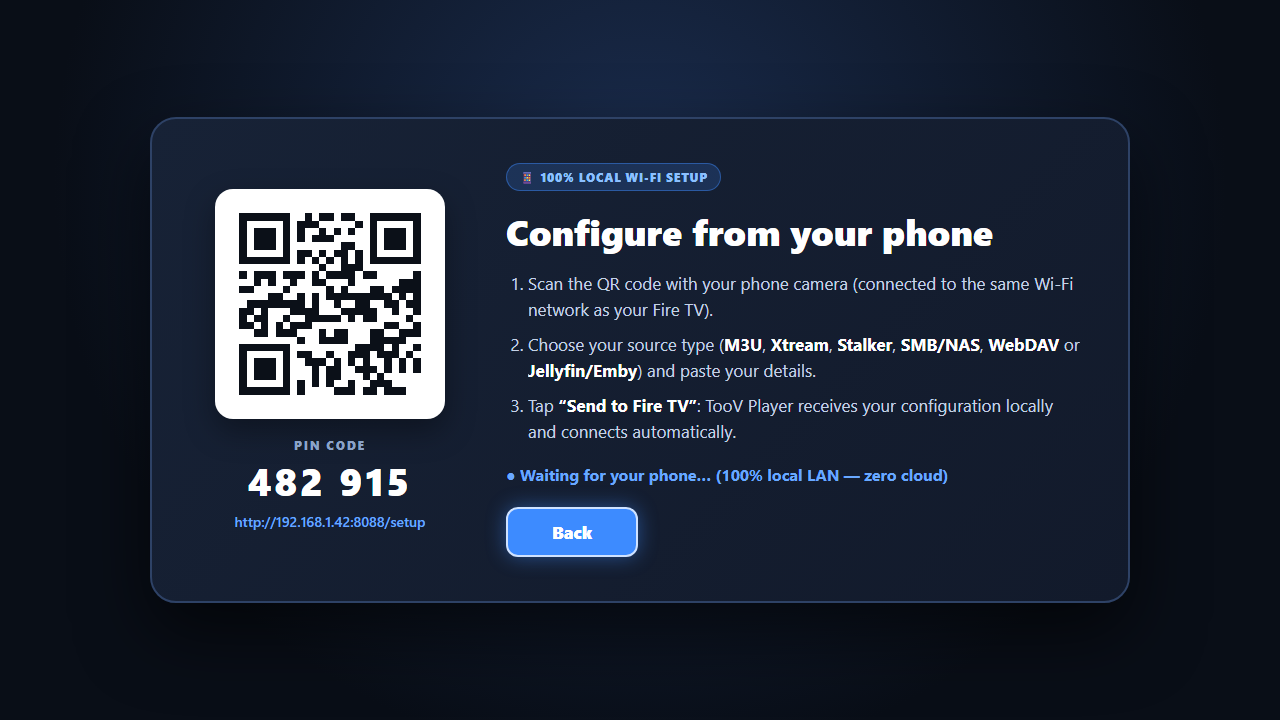
Typing long URLs or passwords with a TV remote is slow. TooV Player includes a built-in local web setup server right inside your Fire TV:
- Open Configure from phone (QR) from the Sources screen (or Settings → Sources → Add source).
- Ensure your smartphone is connected to the same Wi-Fi network as your Fire TV.
- Scan the on-screen QR code with your phone camera (or type the displayed
http://<fire-tv-ip>:8088/setupaddress and 6-digit PIN). - Select the source type (M3U, Xtream, Stalker, SMB/NAS, WebDAV, or Jellyfin/Emby), paste your details, and tap Send to Fire TV.
- TooV Player automatically receives the configuration over your local LAN and connects immediately.
3. Fire TV Remote Shortcuts (D-Pad Cheat Sheet)
Every screen in TooV Player is engineered for smooth, trap-free Fire TV remote navigation:
| Context | Button | Action |
|---|---|---|
| Live TV Grid | ↑ / ↓ | Scroll channels with fixed-center cursor (instant zapping without focus jump) |
| Live TV Grid | OK (1× / 2×) | 1st press starts mini-player preview · 2nd press opens fullscreen playback |
| Live TV Grid | Hold OK | Add or remove the highlighted channel from Favorites |
| Live TV Grid | ← / Back | Step back cleanly: Channel List → Categories → Left Navigation Rail |
| Live TV Mini-Player | 2× Back | Quick-return directly to fullscreen playback of the active channel |
| Fullscreen Live | ↑ / ↓ | Instant channel zap up / down |
| Fullscreen Live | ← | Open the Full EPG & Multi-Day Catch-up (Replay) Guide |
| Fullscreen Player | OK / Menu | Show/hide OSD overlay (audio tracks, subtitles, aspect ratio, stream info) |
| Fullscreen Video / VOD | ← / → | Precise rewind / fast-forward seek steps with timeline preview |
| Navigation Rail | 2× Back | Open exit confirmation dialog (prevents accidental app closure) |
4. Live TV, EPG Guide & Multi-Day Catch-up
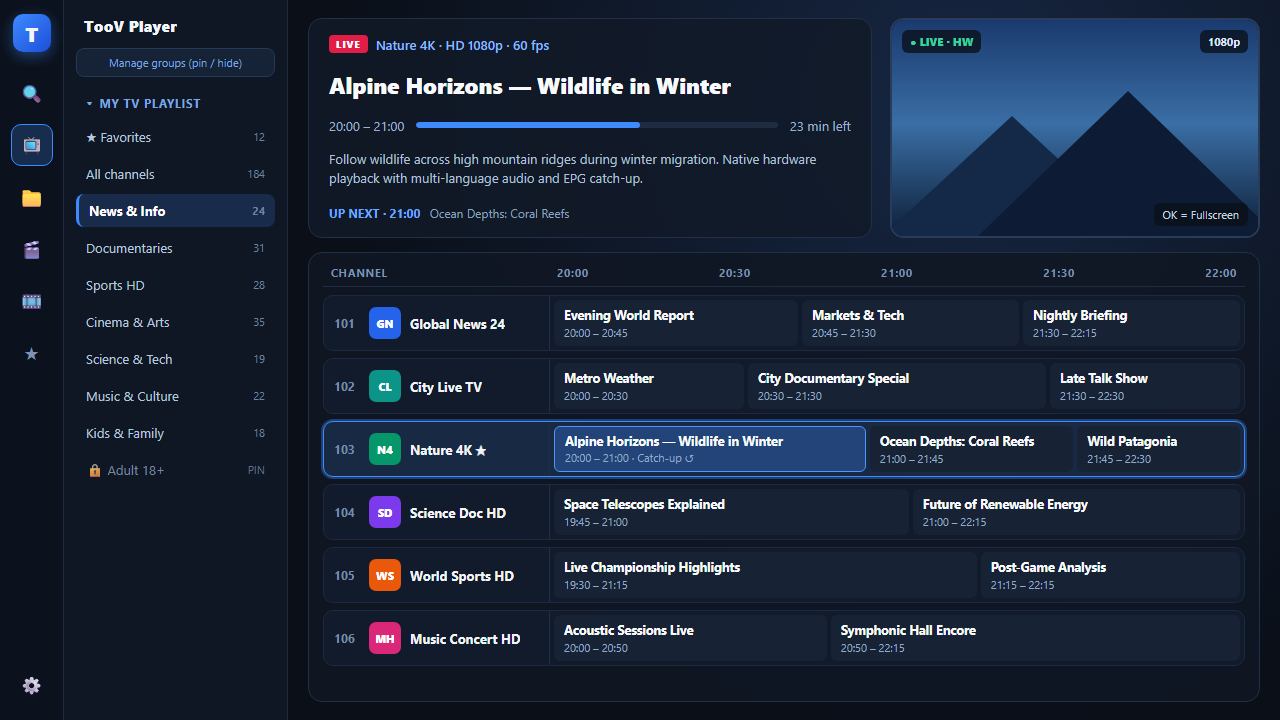
The Live TV workspace uses a clean 3-panel architecture inspired by top TV players:
- Left Navigation Rail: Search, Live TV, Media Hub, Movies, Series, Favorites, and Settings.
- Categories Column: Browse Favorites, All Channels, or provider groups. Select Manage groups to pin your favorite categories to the top or hide unused groups.
- EPG & Mini-Player Preview: Preview a channel in the corner while browsing programs across the horizontal EPG timeline, or switch to the Channel Logo Mosaic mode in Settings → Appearance → Live view.
- Full EPG & Catch-up Guide: While watching Live TV fullscreen, press ← to open the multi-day Replay Guide. Select a past day and any catch-up-enabled program to start replay playback immediately.
5. Movies, Series (VOD) & Unified Search
- Movies & Series: Browse poster grids by category across all enabled Xtream and Stalker sources, view rich synopses, ratings, cast, seasons/episodes, watch trailers, and save titles to My List.
- Unified Search: Open Search from the left rail to search Live TV channels, Movies, and Series simultaneously. Press OK on the search box to use the on-screen keyboard or your Fire TV remote’s voice microphone.
6. Universal Media Hub (SMB/NAS, Plex, Jellyfin, Emby, WebDAV & Web URL)
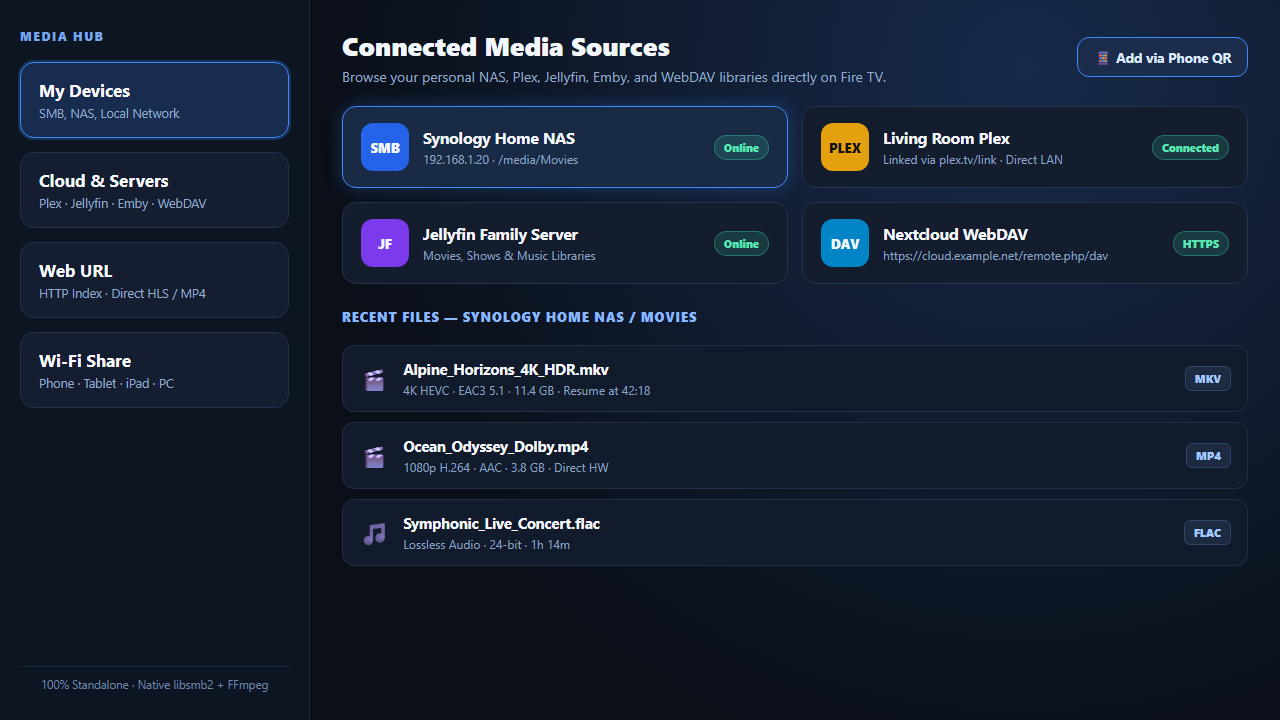
Open Media from the navigation rail to access all your personal and home-network libraries without any external helper app:
- My Devices (SMB / NAS): Automatically discovers local SMB/CIFS shares on your LAN via the embedded native
libsmb2module (supports guest and authenticated shares, remembering credentials locally). - Plex (Standalone): Select Cloud → Plex, scan the QR code to visit
plex.tv/link, and enter the 4-character code displayed on your TV. TooV Player discovers your local, remote, and shared Plex servers automatically and streams directly using your Plex token. - Jellyfin & Emby: Enter your server URL and account credentials (or send them via Phone QR Setup) to browse Movies, TV Shows, Music, and Folders with artwork and direct playback.
- WebDAV & Nextcloud: Built-in quick presets for Nextcloud, Synology, QNAP, and custom WebDAV servers over HTTP or HTTPS.
- Web URL: Open any direct video/audio stream URL (HTTP/HTTPS, HLS
.m3u8, DASH.mpd, RTSP, RTMP) or browse Apache/Nginx HTTP directory indexes.
7. Wi-Fi Share (Cast Files & Links from Phone / Tablet / PC)
Want to watch a video stored on your phone, iPad, or laptop on your TV? Open Media → Wi-Fi Share:
- TooV Player launches a local web portal on your Fire TV (port
8088) with a QR code and a 6-digit PIN. - Scan the QR code from your phone, tablet, or computer on the same Wi-Fi.
- Upload videos, audio files, or photos—or paste any direct media web link—to play them immediately on your TV screen.
8. Built-in Player, Tracks, Subtitles & Supported Formats
TooV Player pairs Vega OS hardware video decoding with an embedded native FFmpeg remuxing engine right inside the app:
- Containers: MKV, MP4, AVI, TS/M2TS, MOV, WebM, FLV, HLS (
.m3u8), DASH (.mpd), raw IPTV streams. - Video codecs: H.264/AVC, H.265/HEVC, VP9, AV1, MPEG-2/4.
- Audio codecs: AAC, AC3 (Dolby Digital), EAC3, DTS, MP3, FLAC, Opus.
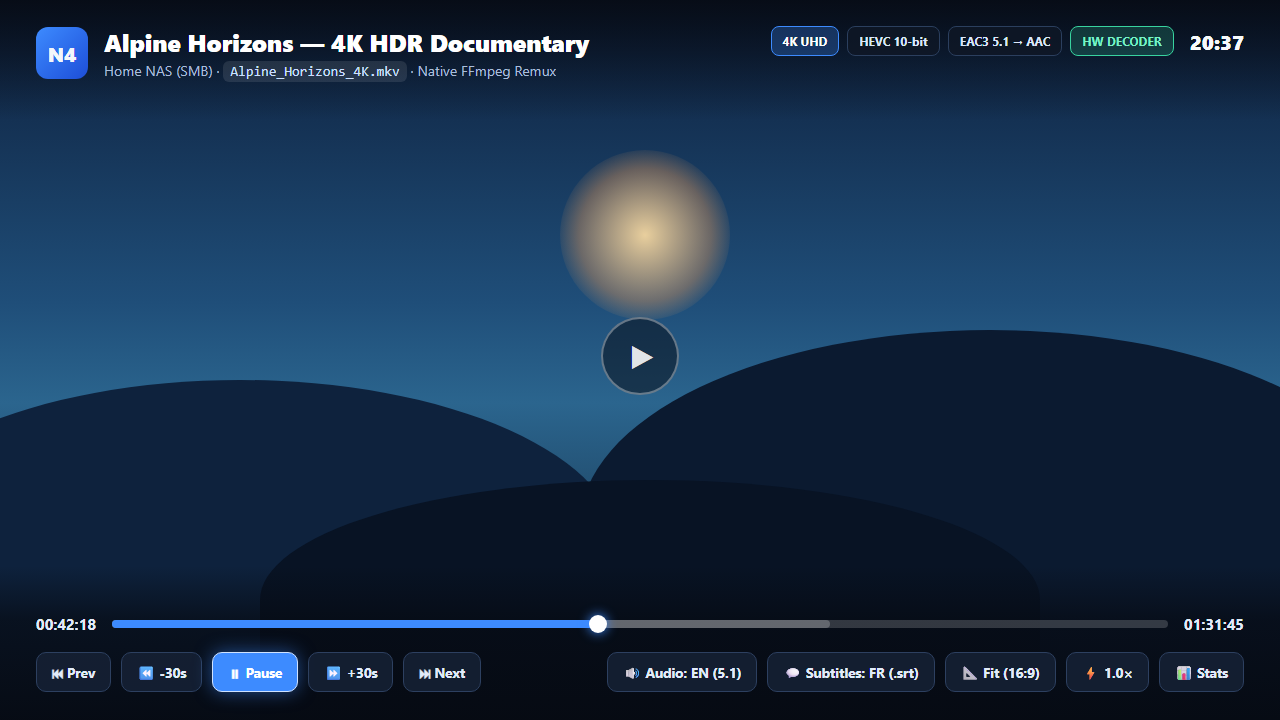
- Automatic On-Device Remuxing: When a container or audio stream (such as MKV with DTS/AC3 over SMB or WebDAV) is not natively accepted by the TV’s hardware pipeline, TooV Player seamlessly remuxes it on-device into a smooth hardware-decoded stream.
- OSD Quick Controls: Press OK during playback to switch Audio tracks, enable/select Subtitles (embedded or external
.srt/.ass/.vttwith sync offset), change Aspect Ratio (Fit, Fill, Stretch, 16:9, 4:3, Zoom), adjust Playback Speed, or inspect live stream stats (resolution, codec, hardware/remux mode). - Resume Points (Pro): Automatically remembers where you stopped watching long NAS/Plex/WebDAV videos and prompts to Resume or Start from the beginning.
9. 4-Digit PIN Parental Controls
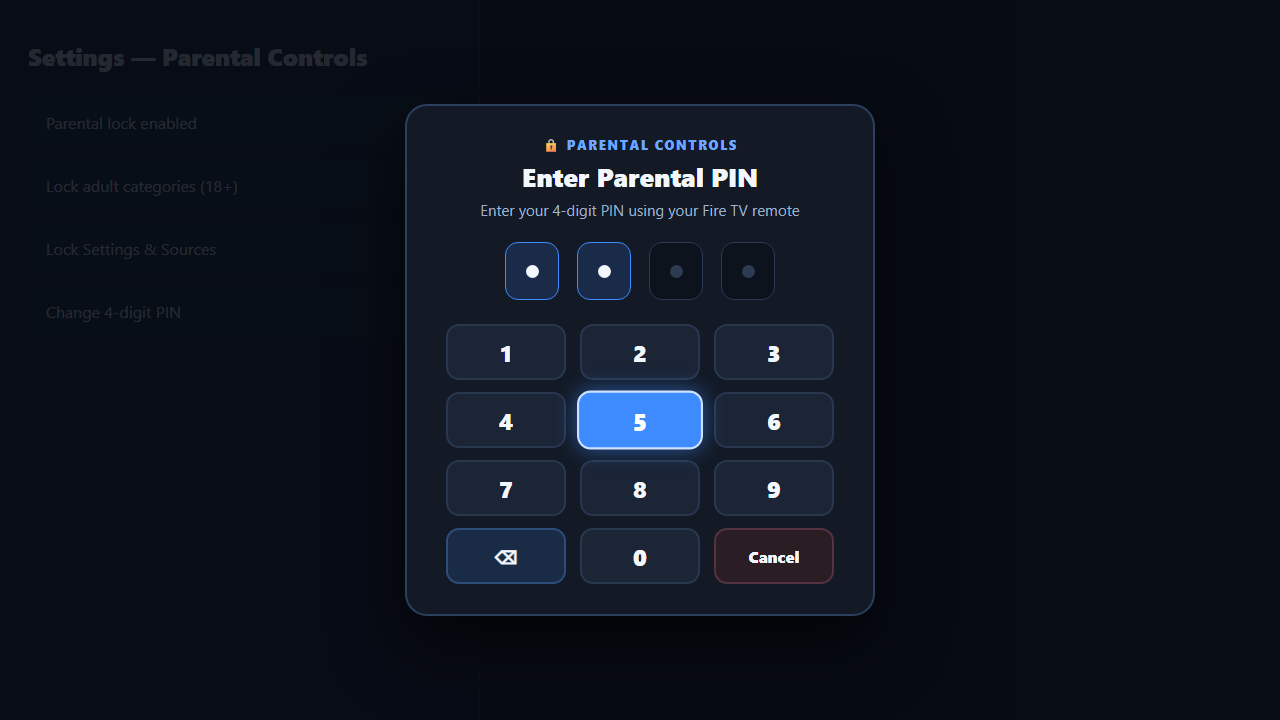
Included free for every family, TooV Player’s parental lock works completely offline with your Fire TV remote:
- Open Settings → Parental controls.
- Select Set 4-digit PIN and enter + confirm your PIN using the on-screen 0–9 remote keypad.
- Choose what to protect:
- Lock adult categories (18+): Automatically marks adult groups with a lock icon (
🔒) and hides adult channels and VOD titles from All Channels, Favorites, and Search until unlocked. - Lock Settings & Sources: Requires your 4-digit PIN before anyone can open Settings or add/remove sources.
- Lock adult categories (18+): Automatically marks adult groups with a lock icon (
- Once you enter the PIN to unlock a session, you stay unlocked until you restart the app—or tap Re-lock this session in Settings → Parental controls at any time.
10. Settings Overview, Free vs TooV Pro & Troubleshooting
Settings Categories
- Sources: Add new sources (Phone QR or TV form), refresh all catalogs, toggle visibility checkboxes, or delete sources.
- General: Interface language (EN, FR, DE, ES, IT, PT), startup behavior (resume last place vs always Live, playlist vs fullscreen), long-press OK for Favorites, zap bar timeout.
- TV Guide (EPG): Guide depth (1–7 days), auto-refresh, Up Next display, automatic Fire TV timezone sync or manual timezone selection.
- Playback: Buffer profile (Small / Medium / Large) and Hardware Decoder toggle.
- Appearance: Live view mode (EPG Grid vs Logo Mosaic), channel logos, compact lists, 24-hour clock, category sort order (Provider vs A→Z).
- Parental Controls: Enable/disable lock, adult 18+ lock, Settings/Sources lock, change/remove PIN, re-lock session.
- TooV Pro: Upgrade via Amazon In-App Purchasing ($10.99 USD/year with 7-day free trial or $29.95 USD lifetime) or tap Restore purchases on any Fire TV linked to the same Amazon account.
Quick Troubleshooting
- Phone cannot open the QR setup page: Verify your phone is on the exact same Wi-Fi band/router (not mobile 4G/5G or a Guest Wi-Fi with AP isolation) and accept HTTP if your mobile browser tries HTTPS first.
- Stream buffers or stutters: Try increasing the buffer in Settings → Playback → Buffer size to Large, or check your Wi-Fi signal strength.
- EPG times are shifted by an hour: Check Settings → Appearance → Time zone and confirm it matches your region (or set to Device (Fire TV)).
- TooV Pro not active after reinstall: Open Settings → TooV Pro → Restore purchases.
Still need help? Visit our Support page or email [email protected].